Ads
Displaying Google Ads in Flet apps.
It is powered by the google_mobile_ads Flutter package.
Platform Support
| Platform | Windows | macOS | Linux | iOS | Android | Web |
|---|---|---|---|---|---|---|
| Supported | ❌ | ❌ | ❌ | ✅ | ✅ | ❌ |
Usage
To use ads controls add flet-ads package to your project dependencies:
- uv
- pip
uv add flet-ads
pip install flet-ads
Requirements
The below sections show the required configurations for each platform.
Android
A valid AdMob app ID is required to be specified, otherwise the app might crash on launch or behave unexpectedly.
- flet build
- pyproject.toml
flet build apk \
  --android-meta-data com.google.android.gms.ads.APPLICATION_ID="ca-app-pub-xxxxxxxxxxxxxxxx~yyyyyyyyyy"
[tool.flet.android.meta_data]
"com.google.android.gms.ads.APPLICATION_ID" = "ca-app-pub-xxxxxxxxxxxxxxxx~yyyyyyyyyy"
See also:
iOS
A valid AdMob app ID is required to be specified, otherwise the app might crash on launch or behave unexpectedly.
- flet build
- pyproject.toml
flet build ipa \
  --info-plist GADApplicationIdentifier="ca-app-pub-xxxxxxxxxxxxxxxx~yyyyyyyyyy"
[tool.flet.ios.info]
GADApplicationIdentifier = "ca-app-pub-xxxxxxxxxxxxxxxx~yyyyyyyyyy"
See also:
Test Values
AdMob provides app and ad unit IDs for testing purposes.
- AdMob app ID:
"ca-app-pub-3940256099942544~3347511713" BannerAd.unit_id- Android:
"ca-app-pub-3940256099942544/9214589741" - iOS:
"ca-app-pub-3940256099942544/2435281174"
- Android:
InterstitialAd.unit_id- Android:
"ca-app-pub-3940256099942544/1033173712" - iOS:
"ca-app-pub-3940256099942544/4411468910"
- Android:
They are not meant to be used in production.
Consent (UMP)
ConsentManager wraps Google's
User Messaging Platform (UMP) to
gather user consent (for example, the GDPR/EEA consent form) before requesting ads.
The consent message itself is created and published in the AdMob console, not in code: Google serves the region-appropriate message (EEA/GDPR, a regulated US state, and so on) based on the user's location. Your app only requests an update and shows the form when required.
Testing the consent form
Force a geography during development with
DebugGeography on
ConsentDebugSettings:
- Simulators and emulators are automatically registered as test devices, so the debug
geography applies on them without any
test_identifiers. - On a physical device, register it first: call
request_consent_info_update()once, then read the device's hashed ID from the native device log. Add that ID totest_identifiersand re-run.
The message carrying the hashed ID differs per platform:
Android (adb logcat):
Use new ConsentDebugSettings.Builder().addTestDeviceHashedId("33BE2250B43518CCDA7DE426D04EE231")
to set this as a debug device.
iOS (Xcode console / Console.app):
<UMP SDK>To enable debug mode for this device,
set: UMPDebugSettings.testDeviceIdentifiers = @[2077ef9a63d2b398840261c8221a0c9b]
Interpreting consent status
ConsentStatus reflects whether a decision was
collected, not what the user chose — it becomes OBTAINED whether they consent
or decline. To gate ad loading, use can_request_ads();
when consent is declined the SDK simply serves non-personalized ads.
Furthermore, the consent status is cached across sessions, so the form is shown only once. When in testing/debug mode,
you can call ConsentManager.reset() to replay the flow as a
first-time user. The test AdMob app ID provided above already has a sample consent message, so it
shows the form during testing; in production your own app ID needs a message published in the
AdMob console.
Under age of consent
Setting tag_for_under_age_of_consent
to True suppresses the consent form — users under the age of consent cannot be asked to
consent. Leave it unset (or False) while testing the form.
Example
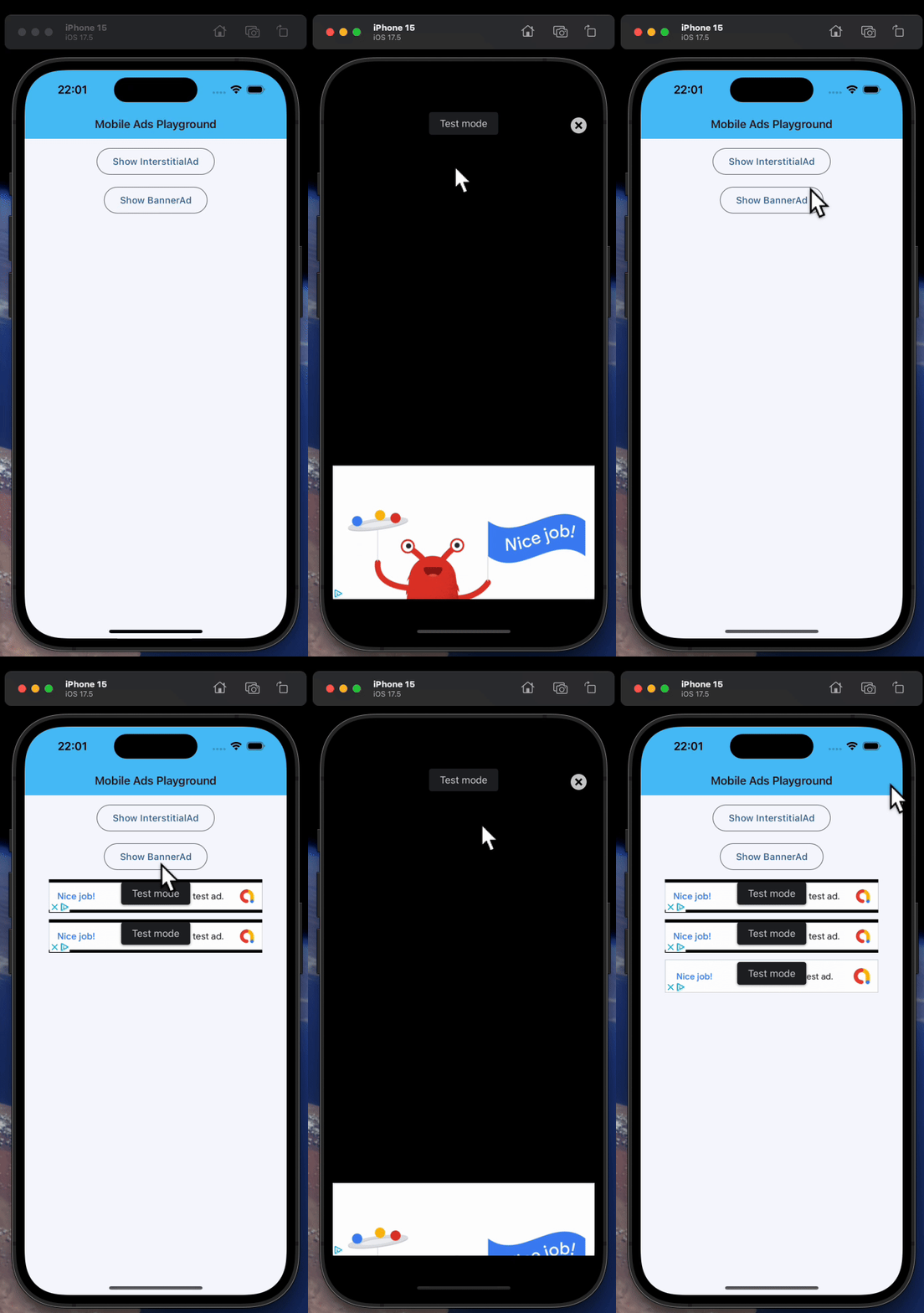
BannerAd and InterstitialAd
import flet as ft
import flet_ads as fta

# Test ad unit IDs
ids = {
    ft.PagePlatform.ANDROID: {
        "banner": "ca-app-pub-3940256099942544/6300978111",
        "interstitial": "ca-app-pub-3940256099942544/1033173712",
    },
    ft.PagePlatform.IOS: {
        "banner": "ca-app-pub-3940256099942544/2934735716",
        "interstitial": "ca-app-pub-3940256099942544/4411468910",
    },
}


def main(page: ft.Page):
    page.appbar = ft.AppBar(
        adaptive=True,
        title="Mobile Ads Playground",
        bgcolor=ft.Colors.LIGHT_BLUE_300,
    )
    page.horizontal_alignment = ft.CrossAxisAlignment.CENTER
    page.scroll = ft.ScrollMode.AUTO

    def show_new_interstitial_ad():
        async def show_iad(e: ft.Event[fta.InterstitialAd]):
            await iad.show()

        iad = fta.InterstitialAd(
            unit_id=ids[page.platform]["interstitial"],
            on_load=show_iad,
            on_error=lambda e: print("InterstitialAd error", e.data),
            on_open=lambda e: print("InterstitialAd opened"),
            on_close=lambda e: print("InterstitialAd closed"),
            on_impression=lambda e: print("InterstitialAd impression"),
            on_click=lambda e: print("InterstitialAd clicked"),
        )

    def get_new_banner_ad() -> fta.BannerAd:
        return fta.BannerAd(
            unit_id=ids[page.platform]["banner"],
            width=320,
            height=50,
            on_click=lambda e: print("BannerAd clicked"),
            on_load=lambda e: print("BannerAd loaded"),
            on_error=lambda e: print("BannerAd error", e.data),
            on_open=lambda e: print("BannerAd opened"),
            on_close=lambda e: print("BannerAd closed"),
            on_impression=lambda e: print("BannerAd impression"),
            on_will_dismiss=lambda e: print("BannerAd will dismiss"),
        )

    page.add(
        ft.SafeArea(
            content=ft.Column(
                controls=[
                    ft.OutlinedButton(
                        content="Show InterstitialAd",
                        on_click=show_new_interstitial_ad,
                        disabled=page.web
                        or not page.platform.is_mobile(),  # mobile only
                    ),
                    ft.OutlinedButton(
                        content="Show BannerAd",
                        on_click=lambda e: page.add(get_new_banner_ad()),
                        disabled=page.web
                        or not page.platform.is_mobile(),  # mobile only
                    ),
                ]
            )
        ),
    )


if __name__ == "__main__":
    ft.run(main)